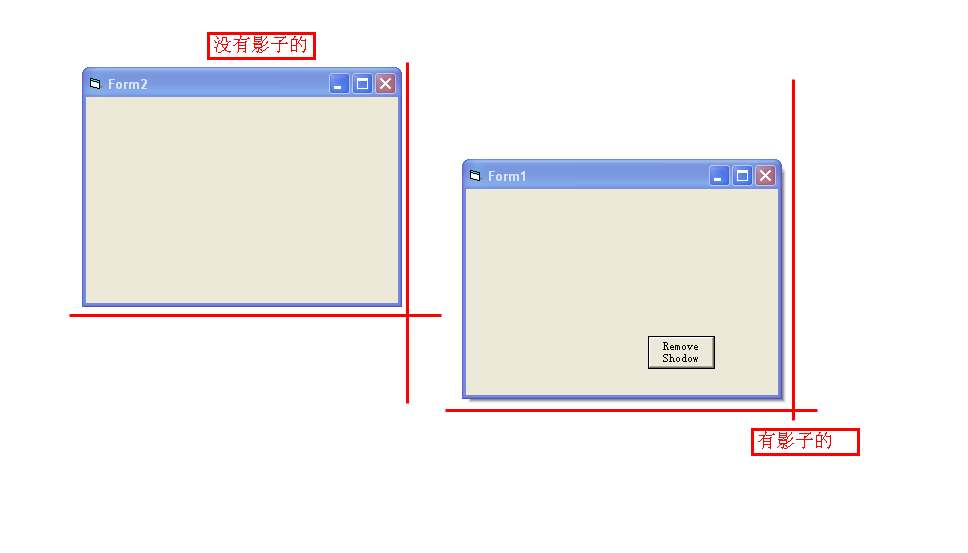
[分享][VB6] 让窗体有阴影的代码
12 Dec 2011
Comments
环境:Visual Basic 6
所需要的控件:Command1
在Form1中添加一个 Command 控件
然后在Form1中添加以下代码:
 Option Explicit

Private Declare Function GetClassLong Lib "user32" Alias "GetClassLongA" (ByVal hwnd As Long, ByVal nIndex As Long) As Long

Private Declare Function SetClassLong Lib "user32" Alias "SetClassLongA" (ByVal hwnd As Long, ByVal nIndex As Long, ByVal dwNewLong As Long) As Long

 Const GCL\_STYLE = ( - 26)

 Const CS\_DROPSHADOW As Long = 131072


 Private Sub Command1\_Click()

     pRemoveDropShadowStyle Me.hwnd

 End Sub

 Private Sub Form\_Load()

     Command1.Move 2730, 2205, 1000, 500


     Command1.Caption = "Remove Shodow"


     pSetDropShadowStyle Me.hwnd


 End Sub

 Public Sub pSetDropShadowStyle(ByVal hwnd As Long)

     If (GetClassLong(hwnd, GCL\_STYLE) And CS\_DROPSHADOW) = 0 Then


        SetClassLong hwnd, GCL\_STYLE, GetClassLong(hwnd, GCL\_STYLE) or CS\_DROPSHADOW


     End If

 End Sub

 Public Sub pRemoveDropShadowStyle(ByVal hwnd As Long)

     If GetClassLong(hwnd, GCL\_STYLE) And CS\_DROPSHADOW Then

         Me.Hide


        SetClassLong hwnd, GCL\_STYLE, GetClassLong(hwnd, GCL\_STYLE) Xor CS\_DROPSHADOW


         Me.Show


     End If

 End Sub
 '代码结束
效果图